 微信
微信 新浪微博
新浪微博 QQ空间
QQ空间 复制链接
复制链接使用swiper制作仿今日头条菜单滑动效果的代码
<!DOCTYPE html>
<html>

<head>
    <meta charset="UTF-8">
    <meta name="viewport" content="width=device-width, initial-scale=1.0">
    <title>仿今日头条菜单</title>
    <link rel="stylesheet" href="https://unpkg.com/swiper@9/swiper-bundle.min.css" />
    <!-- 引入Swiper的CSS样式文件,用于设置Swiper组件的样式 -->
    <style>
        * {
            margin: 0;
            padding: 0;
            box-sizing: border-box;
        }
        /* 全局样式重置,将所有元素的外边距和内边距设为0,并采用盒模型 */

        body {
            font-family: Arial, sans-serif;
        }
        /* 设置页面主体的字体为Arial, sans-serif字体族 */

      .header {
            background-color: #f8f8f8;
            border-bottom: 1px solid #e0e0e0;
            display: flex;
            justify-content: center;
            align-items: center;
            height: 50px;
        }
        /* 设置页面头部的样式:
             - 背景色为浅灰色
             - 底部有一条浅灰色边框
             - 内部元素水平和垂直居中
             - 高度为50px */

      .swiper {
            width: auto;
            height: 100%;
            overflow: visible;
        }
        /* 设置Swiper容器的样式:
             - 宽度自适应内容
             - 高度与父元素(.header)一致
             - 溢出部分可见,防止内容被裁剪 */

      .swiper-slide {
            display: flex;
            justify-content: center;
            align-items: center;
            padding: 0 15px;
            font-size: 15px;
            color: #333;
            cursor: pointer;
            border-bottom: 2px solid transparent;
            transition: border-bottom-color 0.3s ease;
        }
        /* 设置每个Swiper幻灯片(菜单项)的样式:
             - 内部元素水平和垂直居中
             - 左右有15px的内边距
             - 字体大小为15px,颜色为深灰色
             - 鼠标指针悬停时,底部边框变为透明
             - 边框颜色过渡动画,时长0.3s,缓动效果为ease */

      .swiper-slide:hover,
      .swiper-slide_active {
            border-bottom-color: #ff6188;
        }
        /* 当鼠标悬停在幻灯片上或者幻灯片处于激活状态时,
             底部边框颜色变为指定的亮红色 */
    </style>
</head>

<body>
    <div>
        <div class="swiper mySwiper">
            <div>
                <div>推荐</div>
                <div>热点</div>
                <div>视频</div>
                <div>科技</div>
                <div>财经</div>
                <div>体育</td>
                <div>娱乐</div>
                <div>要闻</div>
                <div>军事</div>
            </div>
        </div>
    </div>
    <script src="https://unpkg.com/swiper@9/swiper-bundle.min.js"></script>
    <!-- 引入Swiper的JavaScript库文件,用于实现滑动交互功能 -->
    <script>
        const swiper = new Swiper('.mySwiper', {
            slidesPerView: 'auto',
            // 设置每张幻灯片的可视数量为自动,即幻灯片宽度自适应内容
            freeMode: true,
            // 开启自由滑动模式,允许用户随意拖动幻灯片
            spaceBetween: 0,
            // 相邻幻灯片之间的间距设为0
            centeredSlides: false,
            // 不强制将幻灯片居中显示
            scrollbar: {
                el: '.swiper-scrollbar',
                draggable: true,
            },
            // 设置滚动条相关参数:
            // el指定滚动条元素,draggable设为true表示滚动条可拖动
            on: {
                slideChange: function () {
                    const activeSlide = this.slides[this.activeIndex];
                    const slides = this.slides;
                    for (let i = 0; i < slides.length; i++) {
                        slides[i].classList.remove('active');
                    }
                    activeSlide.classList.add('active');
                }
            }
            // 监听slideChange事件,当幻灯片切换时:
            // 先获取当前激活的幻灯片activeSlide和所有幻灯片slides
            // 移除所有幻灯片的active类,再给当前激活幻灯片添加active类
        });
    </script>
</body>

</html>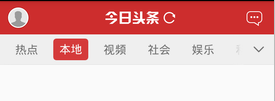
代码说明:
HTML 部分:构建了一个简单的页面头部结构,在头部内放置了一个 Swiper 容器,容器内的每个菜单项都放在 swiper-slide 标签中。
CSS 部分: 对全局元素做了盒模型重置,设置页面字体为 Arial。
给 .header 设定了背景色、边框样式,并且居中显示内部元素。
针对 swiper-slide,定义了文字排版、颜色,添加了鼠标悬停和激活状态下的底部边框样式。
JavaScript 部分: 引入 Swiper 库后,初始化 Swiper 实例,参数 slidesPerView 设为 'auto' 让幻灯片宽度自适应,freeMode 开启自由滑动模式,spaceBetween 设为 0 减少间距,centeredSlides 设为 false 不强制居中显示。
监听 slideChange 事件,当幻灯片切换时,移除所有幻灯片的 active 类,再给当前活动幻灯片添加 active 类,以此标记当前选中的菜单项。

留言评论
暂无留言